
Crosslist FAQ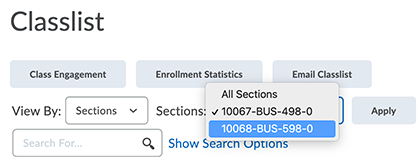
What is a crosslist?
Crosslisting is a way of combining two or more Banner CRNs into a single course offering in D2L. (At the end of this article, read how it all works on a technical level.)
Question: I have an "_xlist" notation in my course listing in D2L. What does that mean? For example, my course says HED-634-0_xlist.
This notation means your course has been crosslisted with another. There are many reasons this is done, but frequently it happens when a program has started a few groups of students in their programs at the same time, but with the size of the groups, it makes sense to combine the sections into one D2L course. There are several advantages to this: 1) there is now a critical mass of of students to deepen learning and encourage multiple perspectives brought into the classroom, 2) there is a greater opportunity for group work and community building within the section, and 3) the course can run at a full compensation rate for the faculty member selected to teach it.
While crosslisting has advantages for students, learning, and compensation of faculty, it does come with some considerations that will be important for you to know:
- Crosslisting cannot be undone, once it's done, it is a permanent action.
- Crosslisting is something that only impacts how the section appears in D2L, so that means that when you are asked to submit Retain Progress Reports you will have more than 1 to do (representing just the students that were originally registered for each, discrete section), and the same applies to final grades. When you enter your final grades, you will submit as many final grade windows as the number of sections that were crosslisted into your one section. It is rare that we crosslist more than 2 sections, but it is important to note that for the number of sections crosslisted you will have the requisite Retain and Final Grade windows to complete.
Should you have questions about your crosslisting, please contact your academic leadership at the college.
Contrubuted by Bettyjo Bouchey, Dean of Online Education
Cancel?
Question: What if I need to cancel a section that is in a crosslist?
Don't. (Messes up the integration for all students in the crosslist.) You can just stop using it to enroll students. But actually, there should be no harm in leaving open a low-enrollment section in a crosslist with one or more larger sections. Remember, the numbers in a crosslist are anchored by the entire enrollment of all the sections.
Split a section?
Question: What if I need to split off a section from a crosslist because it is so big it should stand on its own?
You can't do this directly, because it messes with the D2L integration. Removing the crosslist code in Banner creates major problems for students in the split-off CRN as well as those in the remaining sections. Instead, make a new CRN that is NOT crosslisted and move the students into it. Do not cancel that the now-empty section of the orginal crosslist. Instead, just stop enrolling people into it!
Differentiated learning?
Question: How do I differentiate learning between the sections of my crosslisted course?
While some crosslists are for administrative purposes and do not require differentiated learning, there are some situations where differentiated learning makes sense.
- You can use the same Assignment or Discussion for all students, but indicate the differentiation in the instructions. For example, consider an assignment for a crosslisted course with sections from ECE-, ELE-, and MGE courses. In your instructions, make it clear that the student must respond in the context of the grade level that they are preparing to teach.
- You can use exemptions and/or selective release to modify the learning paths available to students or groups of students.
Not sure where to start? Make an appointment with a learning designer for brainstorming.
What happens?
Question: How, actually, does crosslisting work?
- The same Banner crosslist code is given to each CRN that will belong to a crosslist group. (CRNs that are not to be crosslisted do not have crosslist codes.)
- In the 5th week of the previous academic term, a special software tool is turned on to perform the crosslist in D2L, based on the Banner data. This tool continues to run through term start. Here are its automated actions.
- One of the CRNs (usually the lowest CRN in a group) is turned into parent course, containing a section for each CRN in the group.
- Students and instructors are unenrolled from the original CRN course offerings that are now represented by sections in the parent course.
- Students are enrolled into the parent courrse offering and into the section of that course that corresponds to their original CRN.
- Instructors are enrolled into the parent course and cascade into all of its sections.
- The parent course offering is given a special name and code to indicate both its origins and its crosslisted status.
- The lowest CRN in a crosslist group at the time the D2L crosslist is first executed becomes the parent course. The parent course offering name in D2L reflects the nature of the crosslist group, listing all prefixes and course numbers involved (example: ELE-ECE-470-0_xlist).
- The course offering code of the parent (an easy thing to search for in D2L) has the form 10123x.202230, based on the parent course's original CRN and term but with "x" preceding the period.
- Each section inside the course is named with its original CRN (including one for the section corresponding to the CRN that became the parent course, as well as the other section(s)) is named with its original CRN.
- As students are subsequently registered into any of the CRNs of the crosslist group, they receive correct enrollment for the D2L crosslist parent and the appropriate section of it for their Banner CRN.
